Meeting Owl 4 Plus review: A smarter way to run hybrid meetings
Hybrid work is no longer a trend—it’s the standard. That’s why devices like the Meeting Owl 4 Plus are gaining serious attention. If you’re looking for a simple, all-in-one video conferencing solution, this Meeting Owl 4 Plus review will walk you through everything you need to know—from real-world performance to standout features and potential drawbacks.
Let’s dive in.
Key features at a glance
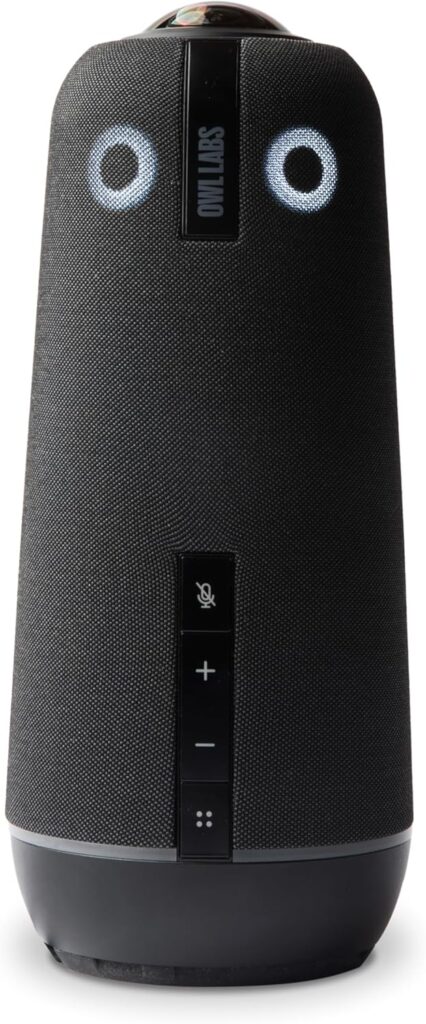
The Meeting Owl 4 Plus is designed as a 360-degree video conferencing device that combines a camera, microphone, and speaker into one compact unit. Its biggest appeal is simplicity—plug it in, and you’re ready to go.
Here are the headline features:
- 4K Ultra HD 360° camera
- AI-powered speaker tracking
- 8-microphone array with wide pickup range
- 360° speaker system
- Compatibility with platforms like Zoom, Teams, and Google Meet
Compared to earlier versions, the jump to 4K video is one of the most noticeable upgrades. (TechRadar)
Design and setup experience
A minimal, modern design
The Meeting Owl 4 Plus has a sleek cylindrical design that sits right in the center of your table. It doesn’t feel intrusive, which is exactly what you want in a meeting environment.
It’s also surprisingly portable, making it easy to move between rooms if needed.
Plug-and-play simplicity
Setup is refreshingly straightforward:
- Connect via USB-C
- Launch your preferred meeting platform
- Select the device
That’s it. No complicated installation or configuration required. (owllabs.com)
This ease of use is one of the biggest reasons businesses choose the Owl lineup.
Video quality and camera performance
True 360° coverage in 4K
The standout feature here is the 360-degree camera, powered by a 64MP sensor delivering 4K video. (owllabs.com)
In practice, this means:
- Everyone in the room is visible
- No need for manual camera adjustments
- Smooth panoramic view plus speaker-focused windows
The device intelligently switches focus to whoever is speaking, creating a more engaging experience for remote participants.
Smart speaker tracking
The AI (often referred to as Owl Intelligence System) automatically detects active speakers and highlights them in real time.
This makes meetings feel more natural—closer to being in the room.
Audio performance: Can it handle real meetings?
Wide pickup range
The Meeting Owl 4 Plus includes an 8-microphone array with a pickup radius of up to 18 feet. (owllabs.com)
In practical terms:
- It works well in medium to large rooms
- Voices are captured clearly, even from a distance
Noise reduction and voice clarity
Features like:
- Echo cancellation
- Background noise reduction
- Voice equalization
…help ensure conversations remain clear, even in less-than-perfect environments.
Smart features and integrations
Works with popular platforms
The device integrates seamlessly with:
- Microsoft Teams
- Zoom
- Google Meet
- Webex and more (owllabs.com)
That flexibility makes it ideal for teams using different tools.
Expandability options
You can extend its capabilities with accessories like:
- Expansion microphones (for larger rooms)
- Pairing with additional Owl devices
This makes it scalable as your meeting space grows.
Real-world experience: What users like (and don’t like)
To give a balanced Meeting Owl 4 Plus review, it’s important to look beyond specs.
What users love
From both professional reviews and community feedback:
- Easy to use with minimal setup
- Great for hybrid collaboration
- 360° view keeps everyone included
- Automatic speaker tracking feels intuitive
Many teams find it especially useful in collaborative environments where multiple people speak frequently.
Common complaints
However, it’s not perfect. Some users report:
“Very sensitive to internet slowdowns… shuts down.” (Reddit)
Others mention:
- Occasional stability issues
- Heat buildup during long sessions
- Performance depends heavily on network quality
These aren’t dealbreakers, but they’re worth considering.
Pros and cons
Pros
- Excellent 360° video coverage
- Sharp 4K resolution
- Strong audio pickup range
- Plug-and-play setup
- Smart AI speaker tracking
Cons
- Can struggle with unstable internet connections
- Not ideal for very large conference rooms without accessories
- Premium positioning may not suit every budget
Who should buy the Meeting Owl 4 Plus?
This device is best suited for:
Small to medium meeting rooms
It performs best when everyone is seated within its optimal range.
Hybrid teams
If your team regularly mixes in-office and remote participants, this device shines.
Businesses prioritizing simplicity
If you don’t want complex AV setups, the Owl is a great all-in-one solution.
We strongly recommend that you check the *PAID LINK* Meeting Owl 4 Plus
Final verdict: Is it worth it?
Wrapping up this Meeting Owl 4 Plus review, it’s clear that this device delivers a strong hybrid meeting experience—especially for teams that value ease of use and smart automation.
The jump to 4K video, combined with improved audio and AI tracking, makes it a meaningful upgrade over earlier versions. While it’s not without flaws, the overall experience is polished and practical.
If your goal is to make meetings more inclusive and less technical, the Meeting Owl 4 Plus is a solid choice.